> ## Documentation Index
> Fetch the complete documentation index at: https://docs.shardcloud.app/llms.txt
> Use this file to discover all available pages before exploring further.
# Applications
> ShardCloud provides a comprehensive hosting platform designed for modern web applications. Our infrastructure supports various deployment scenarios with enterprise-grade features accessible to developers of all levels.
Integrate your own branded domain on our platform
Get instant \*.shardweb.app domains for every app
Automatic deployments from your repositories
Intelligent application restart system
## Production-Optimized Containers
Optimized containers for each supported language
Security and performance optimizations built-in every app
Our container environments are specifically designed and optimized for production workloads, ensuring your applications run efficiently and securely.
**Container Features:**
* **Minimal Base Images**: Reduced attack surface and faster startup times
* **Multi-Stage Builds**: Optimized build processes for smaller final images
* **Security Hardening**: Regular security updates and vulnerability patches
* **Performance Tuning**: Language-specific optimizations and configurations
* **Resource Limits**: Configurable CPU and memory limits
### Supported Languages:
* [Node](/languages/javascript)
* [Python](/languages/python)
* [Golang](/languages/go)
* [C#](/languages/csharp)
* [Ruby](/languages/ruby)
* [Elixir](/languages/elixir)
* [Static html (nginx)](/languages/static)
* [Php](/languages/php)
* [Java](/languages/java)
You can find examples of how to host your projects in each language under the **Languages** section.
## Custom Domains
Our custom domain system allows you to maintain your brand identity while leveraging our robust hosting infrastructure. Simply point your DNS records to our servers, and we'll handle the rest.
**Key Features:**
* SSL certificates automatically provisioned and renewed
* DNS management assistance
* Subdomain support (www, api, staging, etc.)
Navigate to your app network settings and add your custom domain
Point your domain's CNAME to our provided endpoints
Our system automatically verifies and provisions SSL certificates
## Free Subdomains
Every application gets a free `xyz.shardweb.app` subdomain instantly upon creation.
Our subdomain system provides immediate access to your applications without any setup required. Perfect for development, staging, or production environments.
**Benefits:**
* Instant availability upon app creation
* No configuration required
* SSL enabled by default
* Easy to remember naming convention
* Perfect for API endpoints and microservices
## GitHub Integration & Automatic Deployment
Ensure your repository has the correct build configuration before connecting for optimal deployment experience.
Our platform seamlessly integrates with GitHub repositories, enabling continuous deployment workflows that keep your applications up-to-date with every commit.
**Deployment Features:**
* **Automatic Builds**: Triggered on every push to your master/main branch
* **Deploy history**: See the entire deploy history of your application
* **Webhook Integration**: Custom webhooks for external integrations
## Auto Restart System
Our intelligent restart system monitors your application health and automatically recovers from crashes.
The auto-restart feature ensures maximum uptime for your applications through intelligent monitoring and recovery mechanisms.
**How It Works:**
1. **Health Monitoring**: Continuous monitoring of application processes
2. **Automatic Recovery**: Up to 3 restart attempts within a short time period
3. **Circuit Breaker**: Applications stop after limit is reached to prevent resource waste
4. **Reset Timer**: Restart limits refresh automatically after cooldown period
**Restart Triggers:**
* Process crashes or exits unexpectedly
* Memory limit exceeded
* Health check failures
## Real-Time Metrics & Analytics
CPU, Memory, and Network usage in real-time
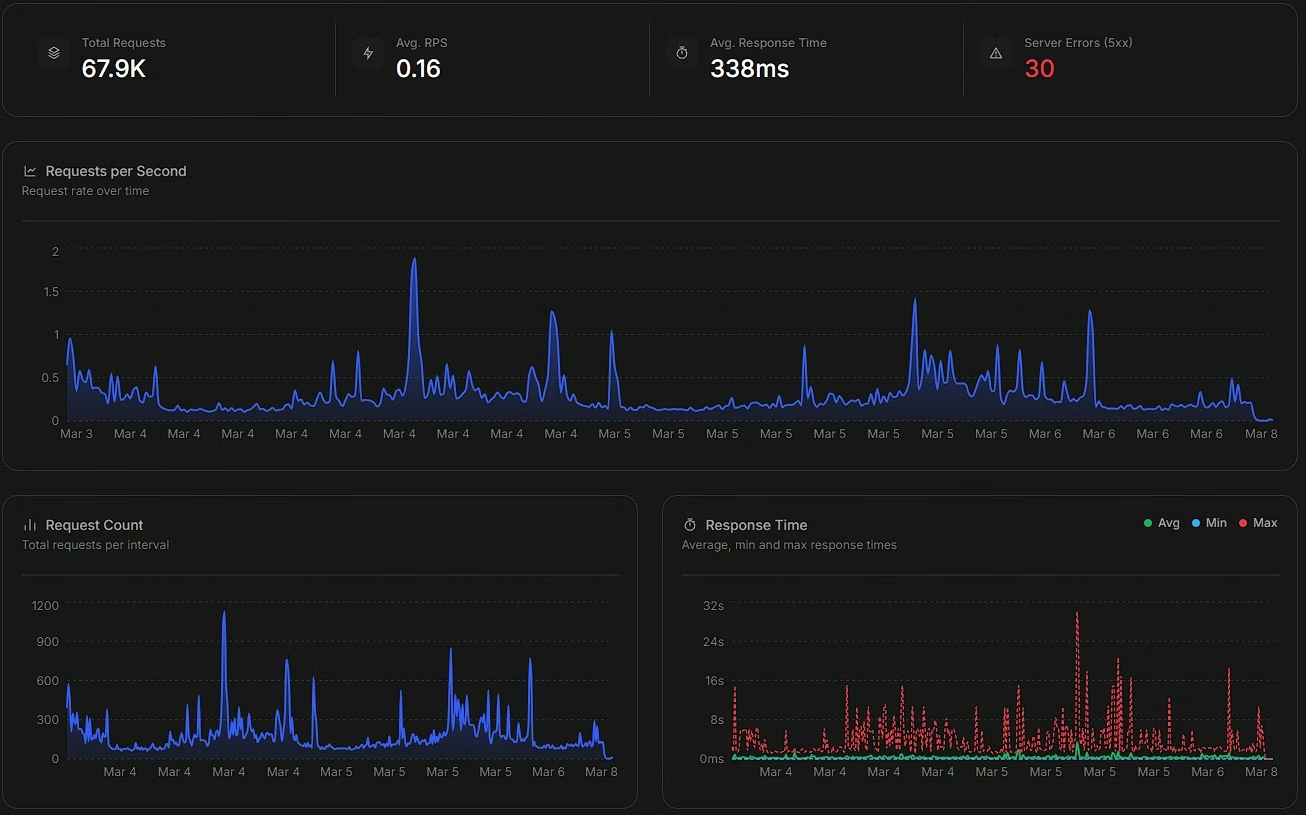
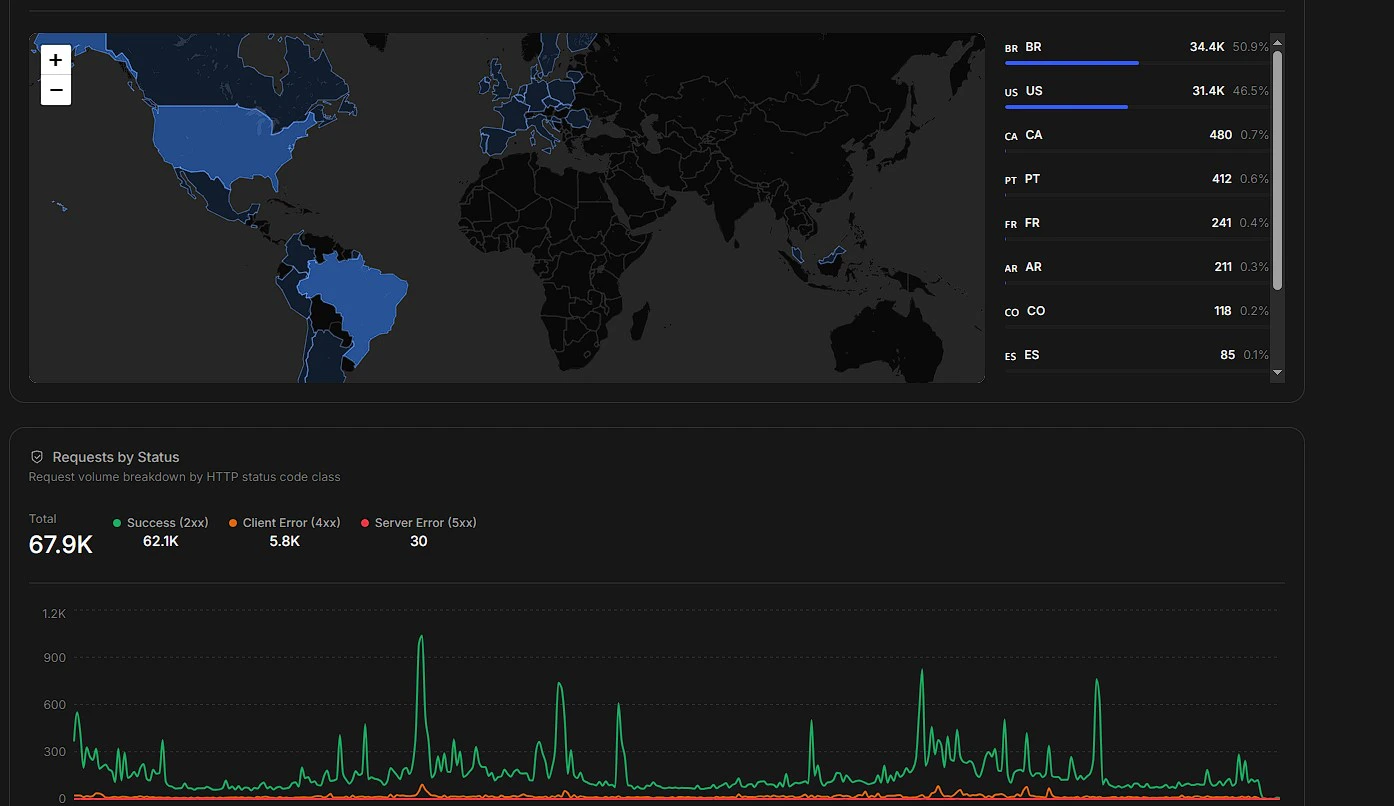
Response times, status codes, RPS, and geographic distribution
Our metrics dashboard provides comprehensive insights into your application's performance with beautiful, easy-to-understand visualizations.
**Resource Metrics:**
* **CPU & RAM**: Real-time utilization tracking
* **Network Traffic**: Incoming and outgoing bandwidth
* **Uptime Statistics**: Historical uptime percentages
### HTTP Metrics
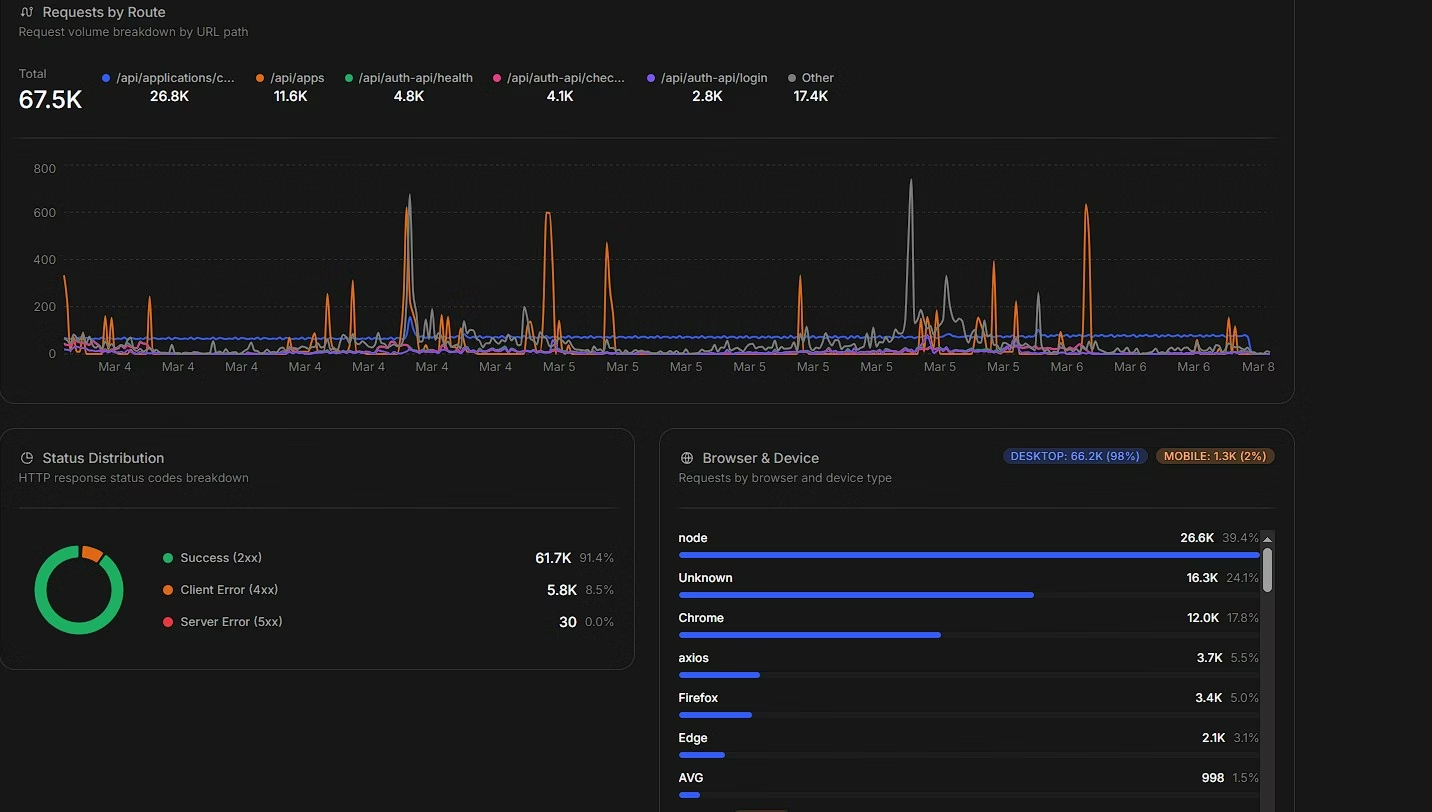
Every application with an exposed endpoint gets detailed HTTP analytics out of the box — no SDK or instrumentation required.
 **Available HTTP Metrics:**
* **Response Time**: Average, minimum, and maximum response times over time
* **Status Codes**: Distribution of 2xx, 4xx, and 5xx responses
* **Requests Per Second (RPS)**: Live request rate tracking
* **Requests Per Route**: Traffic breakdown by individual endpoint
* **Requests Per Browser**: User-agent and device type distribution across your traffic
* **Requests By Country/Region**: Geographic map showing where your traffic originates
### HTTP Request Logs
Every incoming HTTP request is automatically logged — no custom logging middleware needed. Each log entry captures the route, status code, response time, and client information, giving you full visibility into your traffic without writing a single line of logging code.
## Real-Time Logs
Access your application logs instantly without SSH or complex setup procedures.
Our logging system captures all application output in real-time, making debugging and monitoring effortless.
**Log Features:**
* **Live Tail**: Stream logs in real-time as they happen
* **Search & Filter**: Find specific log entries quickly
### Crash & Restart Logging
Every time your application crashes or restarts, we automatically create a snapshot of the current logs, preserving crucial debugging information that might otherwise be lost.
## Backup & Snapshot System
Protect your application data with automated backups and instant recovery options.
Our backup system ensures your application data is always safe with multiple recovery points available.
**Backup Features:**
* **Manual Backups**: Up to 10 backups per application
* **Instant Recovery**: One-click restoration to any backup point
* **Incremental Backups**: Efficient storage using delta compression
Backups are created with only one click
View all available backups with timestamps and size information
Click to restore any backup point with zero downtime
## Integrated File Manager
Access and manage your application files directly from your dashboard.
**File Manager Capabilities:**
* **Real-Time File Browsing**: Navigate your application directory structure
* **Inline Editing**: Edit configuration files directly in the browser
* **File Upload/Download**: Transfer files to and from your application
* **File tools**: Rename/move files in real time
### Supported Operations
* Create, rename, and delete files and directories
* Copy and move files between directories
* View file properties and metadata
* Search for files and content within files
## Custom Dependency Manager
Our dependency manager automatically detects your project type and suggests optimal configurations.
Simplify dependency management with our intelligent system that understands your application's requirements.
**Supported Package Managers:**
* **Node.js**: npm, yarn, pnpm
* **Python**: pip
* **PHP**: composer
* **Go**: go modules
* **Java**: maven, gradle
**Features:**
* **Automatic Detection**: Recognizes package files and install them
* **Cache Optimization**: Intelligent caching for faster startup times
**Available HTTP Metrics:**
* **Response Time**: Average, minimum, and maximum response times over time
* **Status Codes**: Distribution of 2xx, 4xx, and 5xx responses
* **Requests Per Second (RPS)**: Live request rate tracking
* **Requests Per Route**: Traffic breakdown by individual endpoint
* **Requests Per Browser**: User-agent and device type distribution across your traffic
* **Requests By Country/Region**: Geographic map showing where your traffic originates
### HTTP Request Logs
Every incoming HTTP request is automatically logged — no custom logging middleware needed. Each log entry captures the route, status code, response time, and client information, giving you full visibility into your traffic without writing a single line of logging code.
## Real-Time Logs
Access your application logs instantly without SSH or complex setup procedures.
Our logging system captures all application output in real-time, making debugging and monitoring effortless.
**Log Features:**
* **Live Tail**: Stream logs in real-time as they happen
* **Search & Filter**: Find specific log entries quickly
### Crash & Restart Logging
Every time your application crashes or restarts, we automatically create a snapshot of the current logs, preserving crucial debugging information that might otherwise be lost.
## Backup & Snapshot System
Protect your application data with automated backups and instant recovery options.
Our backup system ensures your application data is always safe with multiple recovery points available.
**Backup Features:**
* **Manual Backups**: Up to 10 backups per application
* **Instant Recovery**: One-click restoration to any backup point
* **Incremental Backups**: Efficient storage using delta compression
Backups are created with only one click
View all available backups with timestamps and size information
Click to restore any backup point with zero downtime
## Integrated File Manager
Access and manage your application files directly from your dashboard.
**File Manager Capabilities:**
* **Real-Time File Browsing**: Navigate your application directory structure
* **Inline Editing**: Edit configuration files directly in the browser
* **File Upload/Download**: Transfer files to and from your application
* **File tools**: Rename/move files in real time
### Supported Operations
* Create, rename, and delete files and directories
* Copy and move files between directories
* View file properties and metadata
* Search for files and content within files
## Custom Dependency Manager
Our dependency manager automatically detects your project type and suggests optimal configurations.
Simplify dependency management with our intelligent system that understands your application's requirements.
**Supported Package Managers:**
* **Node.js**: npm, yarn, pnpm
* **Python**: pip
* **PHP**: composer
* **Go**: go modules
* **Java**: maven, gradle
**Features:**
* **Automatic Detection**: Recognizes package files and install them
* **Cache Optimization**: Intelligent caching for faster startup times